
Replacement Back Covers: Pre-Applied Adhesive vs. No Adhesive (and Separate Pre-Cut Adhesive Kits)
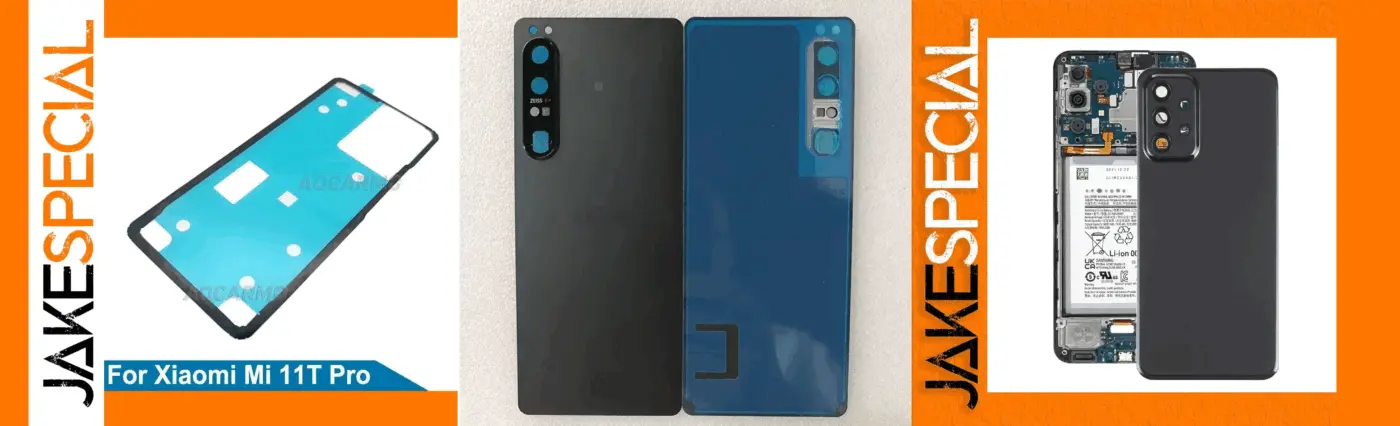
When you replace a smartphone’s back cover, you’ll usually face three practical options. First, you can purchase a back cover with pre-applied adhesive, ready to bond the moment you peel the liners. Second, you can buy a bare back cover and use your own adhesive, typically liquid glue or double-sided tape. Third—and often overlooked—you can buy a separate pre-cut adhesive kit that matches the phone and apply that adhesive to the cover yourself before installation. Each path can deliver an excellent result when executed correctly. This guide explains the differences, the installation workflows, durability and serviceability considerations, and how to pick the best choice for your device and usage.
What Is a Back Cover with Pre-Applied Adhesive?
A pre-applied adhesive back cover ships with precision-cut double-sided tape already bonded to the inside surface. Installation is straightforward: remove the protective films, align the panel, and maintain steady pressure for 30–45 minutes so the adhesive sets. Many technicians use two or three heavy books or a few elastic bands to keep uniform pressure on the perimeter while the bond forms.
Why people choose it: speed, cleanliness, and repeatability. The pre-cut geometry matches the frame, so there is little risk of overflow into microphones or the camera island. It is also easier to reopen later compared with cured liquid glues, which can bead into corners and resist removal.
Trade-offs to note: although the hold is strong for everyday use, certain liquid glues can create a tougher edge seal on worn frames. If you require the tightest possible seal and you won’t need to reopen the phone soon, other options may suit you better.
What Is a Back Cover Without Adhesive?
Non-adhesive panels are bare glass or plastic. You must add adhesive—either pre-cut tape or a liquid adhesive such as B7000. This approach takes longer and demands stricter surface preparation, but it gives you full control over where and how much adhesive you apply, which can be helpful if the frame has minor warping or residual wear from a previous repair.
Why people choose it: maximum control, potentially stronger sealing, and the ability to tailor bead thickness to compensate for small frame imperfections. The downside is extra time, tools, and the risk of mess if glue squeezes out.
Adhesive Options: Tape vs. Liquid
Pre-cut tape—whether already on the cover or supplied separately—keeps the job clean. It excels when the frame lip is clean, flat, and free of old residue. A brief, gentle pre-heat of the frame (not the battery) often improves initial tack and long-term hold. Tape also avoids capillary seepage into microphones or flash windows.
Liquid adhesives such as B7000 fill micro-gaps and can create a robust edge seal. Apply a thin, continuous bead around the perimeter and avoid the camera module area to prevent fogging or seepage. Expect longer cure times and plan to maintain pressure for 45–60 minutes. Removal later will be slower and carries a higher risk of cracking the glass if patience or proper heat is lacking.
Using a Separate Pre-Cut Adhesive Kit (Apply-It-Yourself)
Sometimes you receive a replacement back cover with no adhesive and you prefer not to use liquid glue. In that case, purchase a separate pre-cut adhesive kit designed for your exact model. These kits are die-cut to match the frame, camera island, flash, and microphone ports. The usual workflow is to apply the adhesive to the back cover first, then bond the cover to the frame under pressure.
Why this route is attractive: it provides an OEM-style bond that is cleaner than liquid glue, remains serviceable later, and gives you flexibility to source the color or finish you want. If the cover cracks during practice alignment, you only replace the tape—not the whole adhesive mess.
Cover-first workflow (recommended in most cases): Step 1: dry-fit the bare cover to learn alignment points and confirm the frame is free of debris or warping. Step 2: clean the inside of the cover and the frame lip with ≥90% isopropyl alcohol and a lint-free wipe; let everything dry. Step 3: identify the two release liners on the adhesive (some kits label “cover” and “frame”). Step 4: peel a small section of the first liner, align around the camera island, and lay the adhesive onto the inside of the cover gradually, smoothing as you go to avoid bubbles or stretching. Step 5: very gently pre-warm the adhesive for a few seconds to activate tack. Step 6: remove the second liner to expose the bonding surface. Step 7: lower the cover from the camera side onto the frame and press around the perimeter. Step 8: hold even pressure for 30–45 minutes using elastic bands, a press, or a couple of books.
Frame-first workflow (alternative): Some kits are intended to sit on the frame first. Clean and degrease the frame lip, remove the first liner, position the adhesive on the frame, burnish lightly, remove the top liner, then install the cover. Be extra careful to avoid blocking microphone or pressure equalization ports.
Quality markers when buying: prefer kits with accurate die-cuts that mirror the camera island and ports; select low-profile acrylic tape similar to OEM thickness; consider whether interior ribs are included to resist corner lift. Foam-core tapes fill gaps well but can raise the panel if tolerances are tight.
Common pitfalls to avoid: flipped orientation that misaligns camera or flash windows; adhesive spanning microphone holes; dirty frame lips that cause early corner lift; stretching the tape during application; and rushing the pressure time, which weakens long-term hold.
Water Resistance, Dust Protection, and Real-World Expectations
No third-party repair truly restores the original factory IP rating, because gaskets and compression profiles are calibrated in production. That said, correct tape thickness, careful alignment, and proper pressure time yield excellent everyday dust and splash protection. Pre-applied or separate pre-cut adhesive provides a reliable seal without the permanence of liquid glue. Liquid adhesives, when properly cured, can feel more “locked in,” but plan for slower and riskier disassembly later.
Surface Preparation Matters More Than Choice of Adhesive
Great bonds begin with pristine surfaces. Completely remove the old panel and scrape away residual adhesive using a plastic tool or a warmed spudger. Degrease the frame lip with isopropyl alcohol and a lint-free wipe, then dry-fit the new cover to learn your alignment references. A short, gentle pre-heat of the frame improves tack and reduces future corner lift; avoid heating the battery.
Installation Workflow: Pre-Applied Adhesive Covers
Peel only a small section of liner at first and anchor alignment around the camera island and one long edge. Once centered, peel the remaining liner gradually while smoothing the perimeter. After seating, maintain uniform pressure for 30–45 minutes. Avoid powering on or charging during this period so heat does not soften the fresh bond.
Installation Workflow: Liquid Adhesive
Run a thin, uninterrupted bead around the frame edge while avoiding the camera module area. Lower the cover from one side to the other so the bead compresses evenly. Immediately wipe any squeeze-out along the exterior edge. Maintain pressure for 45–60 minutes and allow additional curing time before pocket use. Re-check corners after ten minutes and add light pressure where needed.
Durability and Serviceability Over Time
Pre-applied or separate pre-cut adhesive is ideal when you expect future service—battery swaps, camera repairs, or board work—because it releases predictably with mild heat. Liquid glue bonds can age very well and resist corner lift on worn frames, but they complicate subsequent openings and increase the risk of cracking the panel during removal.
Which Option Should You Choose?
Choose a pre-applied adhesive back cover if you prioritize speed, cleanliness, and easy future disassembly. Choose a separate pre-cut adhesive kit when your cover ships bare and you want an OEM-style, clean install without using liquid glue. Choose a liquid adhesive when you need the strongest possible edge seal on a device that will not be reopened soon, and you are comfortable with careful application and longer cure times.
Pro Tip from the Workshop
For everyday consumer repairs, the best balance of ease and reliability is often a back cover with pre-applied adhesive or a high-quality separate pre-cut kit applied to the cover. For rugged work phones that see heavy handling or minor frame wear, a carefully applied liquid adhesive like B7000 can provide extra reinforcement—just budget more time and be prepared for a more involved removal if you ever need to open the device again.
Final Thoughts
Whichever route you take, the real secret to a professional outcome is meticulous surface preparation, precise alignment, and disciplined pressure time. Done right, any of the three options restores the phone’s look, protects against dust, and stands up to daily use. The choice is less about right versus wrong and more about matching the adhesive strategy to the phone’s condition, your workflow, and how often you expect to service the device in the future.
